.png?width=280&height=39&name=Projectworks-Logo-Black-280px%20(1).png)
Included in this release
Feedback or questions?
Email us at [email protected] and one of the team will get back to you!
Microsoft Teams for Personal Notifications and Timesheet Reminders
Projectworks now integrates with Microsoft Teams, making it easier to stay on top of your day without switching apps. Receive personal notifications directly in Teams when:
- Your reimbursable expenses are approved or declined;
- Your leave is approved or declined; or
- Your timesheet is approved or needs attention.
If timesheet email reminders are set up, you can also opt to receive timesheet reminders in Teams.
Read more about connecting to Microsoft Teams →
0.00 Invoices Marked as “Paid”
0.00 invoices are now marked as “Paid” in the invoice list screens, so that they no longer inflate your Project’s “Days Overdue” metrics.
If a 0.00 invoice is “Finance Approved”, and you are viewing the “Paid” column in one of the following screens, it will now be marked as “Paid”:
- Invoices > All Invoices;
- Invoices > Ready for Export;
- Project > Invoicing; or
- Company > Invoicing.
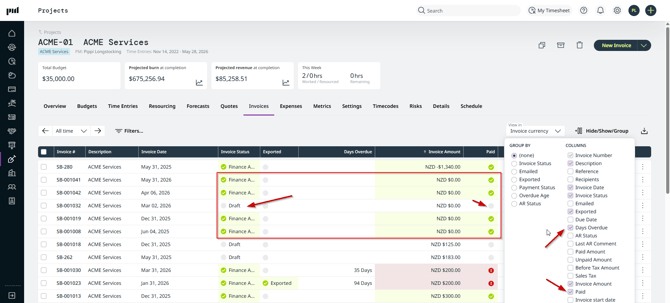
The “Days Overdue” column can be shown in the Project and Company invoice screens.