.png?width=280&height=39&name=Projectworks-Logo-Black-280px%20(1).png)
- Where to find the Email Delivery Log
- What Emails are tracked in the Email Delivery Log?
- How to use the Email Delivery Log
- FAQ/Troubleshooting
Where to find the Email Delivery Log
- Click into the Settings cog.
- Look under the “System” category.
- Click “Email Delivery Log”.
What emails are tracked in the Email Delivery Log?
- Invoices - Project invoices.
- Welcome Emails - Invitation emails sent to users to log in to your Projectworks space.
- ResetPassword - Password reset emails sent directly to users by Projectworks Customer Support (not password reset emails self-generated by users).
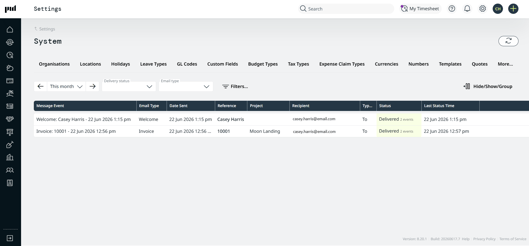
How to use the Email Delivery Log
- View a list of sent emails in the table.
- Use the Filters & Hide/Show/Group functions to curate your view as needed. You can filter by date range, delivery status, email type and more.
- There’s a daily automated sync to check for status updates. You can click Refresh Statuses in the top right corner to manually check if there's been any updates to the statuses of the emails shown.
- Click the Invoice Number in the Reference column to see a copy of the invoice.
Delivery Status
Pending - Delivery is in progress.
Delivered - Email has been successfully delivered to the recipient.
Failed - Email was not delivered to the recipient.
Opened - The recipient has opened the email.
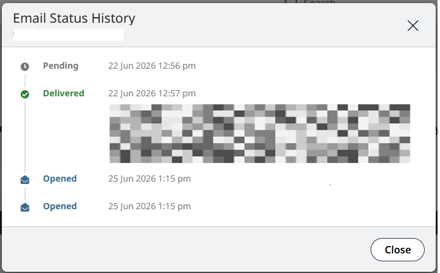
To view the full delivery event history for a specific email, click its status in the Status column. (Sample recipient details blurred).
FAQ/Troubleshooting
I can’t see Email Delivery Log in my settings
Ensure that the Admin.System.EmailLog.View permission is enabled for your Access Level (found in the More Options tab of the Access Level settings).
Why has my email failed to deliver?
Click the Failed status for that email to view the failure details.
I’m trying to click on a reference but it’s not clickable
This occurs when the associated invoice or user has been deleted. The log entry is retained, but the reference link is no longer active.