.png?width=280&height=39&name=Projectworks-Logo-Black-280px%20(1).png)
The hierarchy
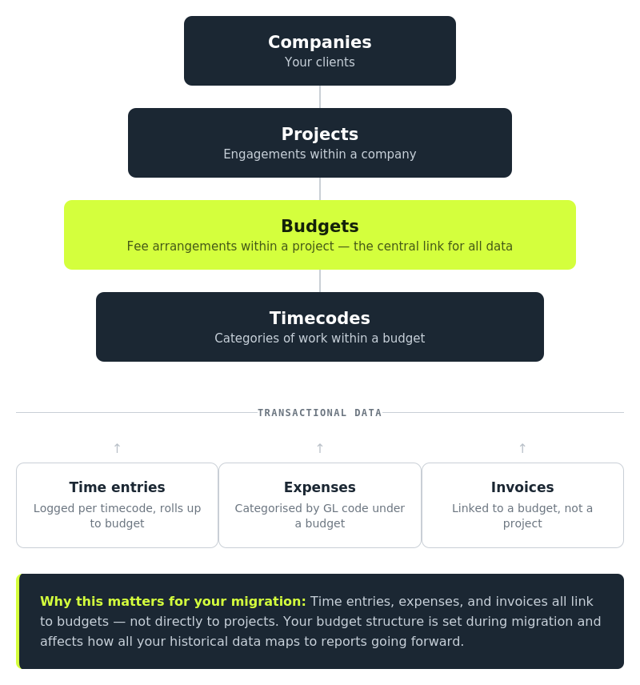
Projectworks organises your work in layers:
- Companies are your clients. Every piece of work sits under a company.
- Projects sit under each company. A project is a piece of work you are delivering for that client.
- Budgets sit under each project. A budget tracks either time or expenses, and is what drives your invoicing. Each budget becomes an invoice line when you bill.
- Timecodes sit under budgets. These are what your team logs their time against day to day.
How everything connects
Your time entries, expenses, and invoices all link to budgets, not directly to projects. This is the part most people find new when coming to Projectworks.
When your team logs time, they log it against a timecode. That timecode sits under a budget. When you create an invoice, the invoice pulls from the budget. So the budget is the central piece that connects the work your team does to the invoices you send to your clients.
Why this matters for your migration
When we migrate your data, we need to map your existing data into this structure. Depending on where your data is coming from, some of this mapping happens automatically, and some of it involves a few decisions from you.
For example, if you are coming from a system where you log time against tasks (like Harvest, Xero Projects, or WorkflowMax), we need to decide how those tasks become budgets. By default, we map each task to its own budget, which preserves the invoicing structure you are used to.
If you are migrating from spreadsheets, you will be setting the structure yourself using our template, so it helps to understand how companies, projects, budgets, and timecodes relate before you start filling it in.
Key things to remember
- Budgets drive your invoicing. How you break a project into budgets affects how your invoice lines look.
- Time and expenses link to budgets, not projects. If something looks like it is in the wrong place, check which budget it is sitting under.
- Each person has a billable rate, which is the default charge-out rate. This can be overridden on individual projects.
- Cost rates (what a person costs your business) are needed if you want margin and profitability reporting.