.png?width=280&height=39&name=Projectworks-Logo-Black-280px%20(1).png)
Before you get started, you need to first setup a Sage Intacct Web Services user.
See How to setup Sage Intacct to connect with Projectworks →
You will need the login details for that user to complete the below.
- Connect Sage Intacct with Projectworks
- Configure Sage Intacct Integration for Invoices
- Configure Sage Intacct Integration for Expenses
- Configure Sync between Projectworks and Sage Intacct
Connect Sage Intacct with Projectworks
-
In Projectworks, navigate to Settings → Integrations > Accounting and select Sage Intacct.
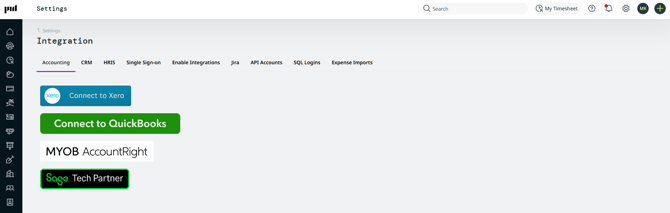
- Enter the Web Services user details you previously setup in Sage Intacct to authorize the connection.
See How to setup Sage Intacct to connect with Projectworks →
Only use the Web Services user login to authorize the connection, do not authorize via any other user from your Sage Intacct account.
Configure Sage Intacct Integration for Invoices
In the configuration screen, you can configure the Sage Intacct integration to Projectworks.
If you have multiple organizations in Projectworks, each organization can be connected to different Sage Intacct company, or you can connect them all to the same one if you choose.
Invoicing Integration allows you to connect Projectworks with Sage Intacct to send invoices from Projectworks to Sage Intacct for processing.
You can send the invoices to customers from Projectworks, export the sent invoice to Sage Intacct, and monitor payments in Sage Intacct.
Once payment is received, you can sync that information back into Projectworks to have up to date information on the project financials.
Example workflow:
- Send the invoices to customers from Projectworks
- Export the sent invoice to Sage Intacct
- Monitor payments in Sage Intacct
- Once payment is received, sync that information back into Projectworks
How to configure Sage Intacct Integration for Invoices
-
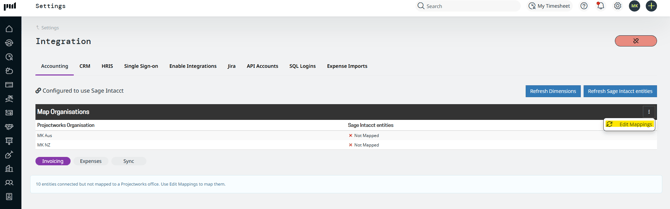
In Projectworks, navigate to Settings → Integrations > Accounting and select Sage Intacct.
- Click the three dot menu and selecting ‘Edit Mappings'.
-
Use the drop-down in the pop-up menu to map Sage Intacct Organisations with Projectworks organizations.
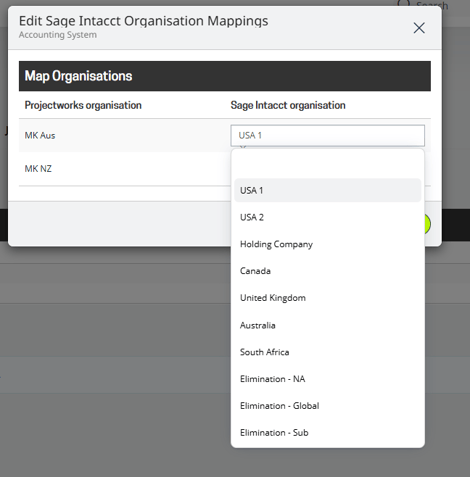
- Select your desired mapping and select ‘Update Mappings’.
The screen will update with organization specific configuration options.
You will see the following sections;
- General Invoice Options - to control how invoices get exported
- Tax Types - if you are operating in the US, we recommend relying on Sage Intacct’s tax engine for all Sales Tax needs.
- GL Codes - to control which Projectworks GL Codes map to which Sage Intacct Accounts
- Currencies - shows which currency is set as the base currency in Sage Intacct.
- Default Dimensions
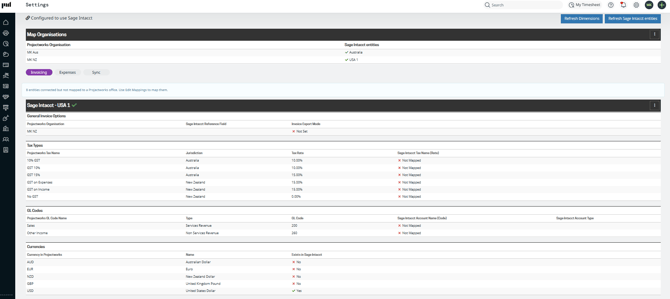
To start configuring each section, select the three dot menu on the banner and select "edit mappings".
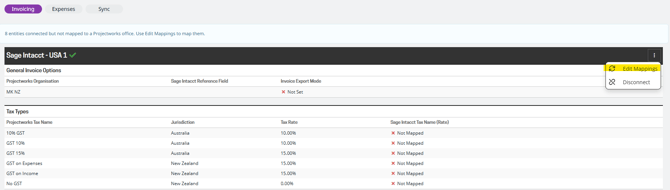
- Configure General Invoice Options
- Sage Intacct Reference Field - This allows you to choose what Projectworks sends to the Sage Intacct invoice reference field.
- Invoice Export Mode - this allows you to choose whether Projectworks sends invoices to Accounts Receivable or the Order Entry module in Sage Intacct.
If you opt to use Order Entry, the Tax Types and GL code mappings are not necessary as Sage Intacct will determine these via the Item selection for each invoice line.
When selecting order entry, two new dropdowns will be visible right next to the Order entry selection to get the invoices and credit note documents that you want to use
- Map Tax types if applicable. These selections can be left empty if you use Sage Intacct’s tax engine for sales tax.
- Map GL Codes. Select which Projectworks GL code maps to which Sage Intacct Account.
- Select ‘Update Mappings’.
Repeat the setup for each organization you want to integrate with Sage Intacct.
The organization configurations are independent from one another, so if you want to use Order Entry with one organization and Accounts Receivable with another, that is possible.
Configure Sage Intacct Integration for Expenses
If you wish to export Expenses from Projectworks to Sage Intacct Accounts Payable module as bills to pay, you need to configure the Expenses integration for each Projectworks organization you want to export expenses.
- Select the ‘Expenses’ button on the Settings → Integrations > Accounting.
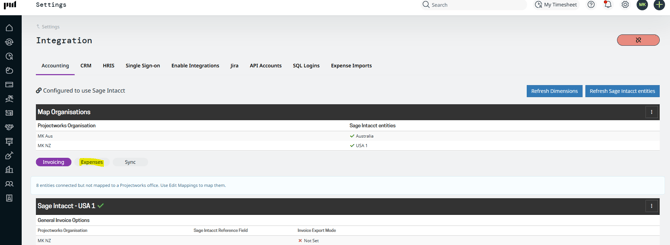
-
Select the three dot menu for the organization you want to export expenses from and select ‘Edit Mappings’.
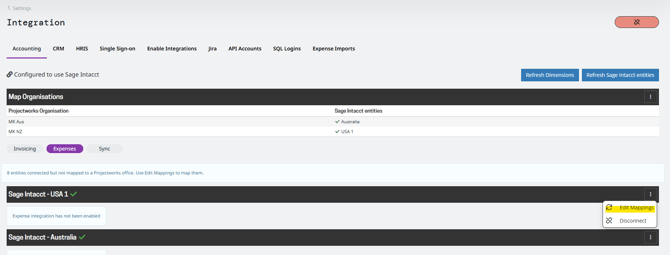
-
Tick the ‘Enable expenses integration’ and select the Sage Intacct Account that you want to map your Projectworks Expense GL to.
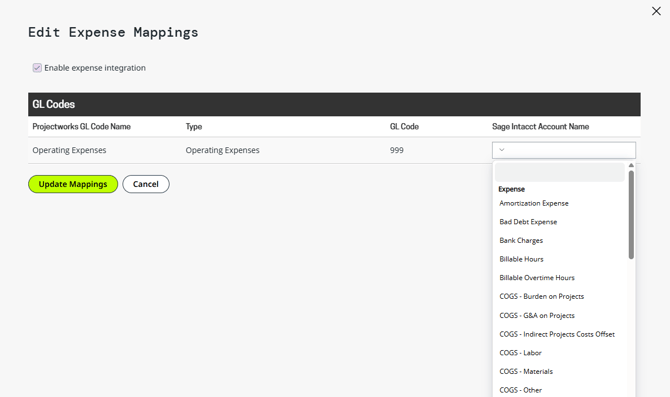
-
Select ‘Update Mappings’ and repeat the process for all organizations you want to be able to export expenses to Sage Intacct.
Configure Sync between Projectworks and Sage Intacct
Projectworks supports both manual and automated sync of data with Sage Intacct. If you want to send some or all invoice and/or expense data between systems automatically, you can configure a sync between Projectworks and Sage Intacct.
-
Select the ‘Sync' button in the Accounting Settings page
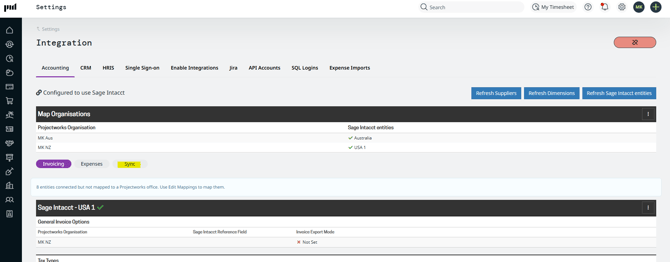
It will display the current sync configuration across organizations.
-
To enable or edit any of the sync options, select the three dot menu for the organization you want to automatically sync and select ‘Edit Mappings’.
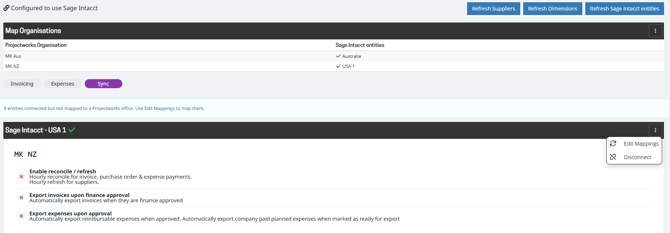
- A pop-up with three options will appear.
- Enable reconcile/refresh - this sets up an hourly payment reconciliation sync for invoices, purchase orders and expense payments.
- Export invoices upon finance approval - this sets up an automatic export for invoices when they are finance approved.
- Export expenses upon approval - this sets up an automatic export for expenses for reimbursable expenses when approved and automatically exports company paid planned expenses when marked ‘ready for export’
- Make your selection and select ‘Update Mappings’.
- Your selected data points will now automatically sync between Projectworks and Sage Intacct.