.png?width=280&height=39&name=Projectworks-Logo-Black-280px%20(1).png)
Please note this is a Beta Feature.
- How does it work?
- Connect your Projectworks and BambooHR accounts
- Configure the sync
- Leave requests over Public Holidays
How does it work?
Employees enter leave in BambooHR which then pulls through into Projectworks. Leave configuration and setup can be managed entirely within BambooHR to reduce double handling.
When a new leave request is created, Projectworks pulls the leave record through and ensures the employee availability in Resourcing views is up-to-date by matching BambooHR work email with the employee email in Projectworks and pulling their leave from BambooHR to Projectworks. Any updates to the request in BambooHR will also get updated in Projectworks, including leave request deletion.
This means leave setup, accruals, and requests can be managed entirely in BambooHR, and Projectworks will be updated to reflect employee availability.
Any leave created, updated, or deleted in Projectworks directly will not be reflected on BambooHR. Therefore, best practice is to manage all leave in BambooHR.
Connect your Projectworks and BambooHR accounts
Step by step guide:
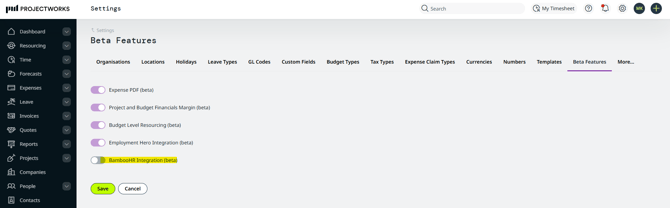
First, in Projectworks navigate to Admin → Settings → Beta Features and enable the BambooHR Beta and hit ‘Save’.
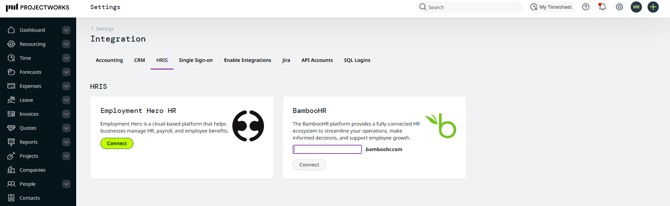
You will see a new tile under the Admin → Settings → Integration called HRIS. Fill in your BambooHR subdomain on the field, and select connect and follow the prompts to and grant required access.
You will be taken back to Projectworks where you can configure your integration.
Configuring the Integration
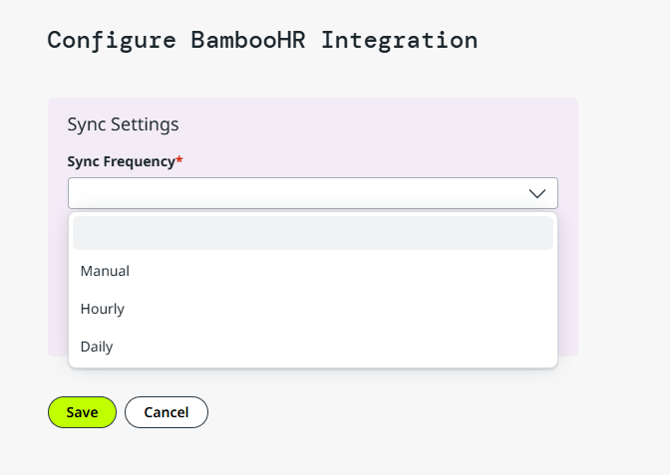
First, you will need to choose how often Projectworks syncs leave from BambooHR by setting the sync frequency.
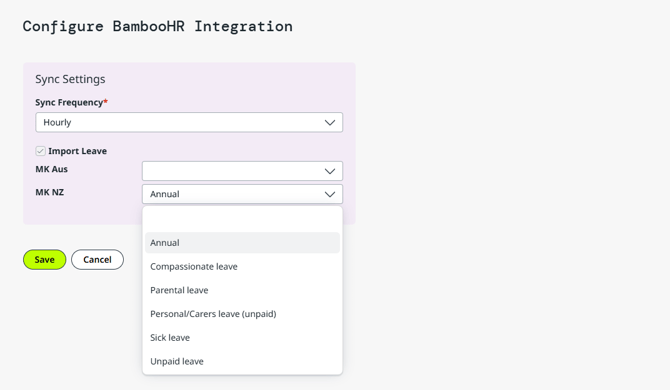
Then you can move to configure the leave mappings. Select your preferred leave type to be used for all BambooHR-generated leave records.
If you operate multi-organization in Projectworks, you can configure each organization independently from one another. However, all organizations can only be connected to a single BambooHR instance, and all organizations will follow the sync frequency you set up first.
Projectworks will now query BambooHR in the interval you’ve selected and fetch any future dated, Pending or Approved leave requests, to Projectworks - it doesn’t matter if it is a new leave request or approved change to a previously-entered leave request.
The initial sync will bring all leave records dated in the future, and subsequent syncs will look for any new requests or updates to the existing.
Leave requests over Public Holidays
BambooHR supports users entering leave over public holidays, but Projectworks prevents leave from created on holidays included in the Holiday Calendars. This can lead to some discrepancies on how leave is displayed.
Read more about Working with Holiday Calendars →
For example:
John puts a leave request through for 23rd of December to the 25th of December, but the 25th of December is a Public Holiday.
Projectworks will consume the leave but will only create leave a record for 23rd and 24th of December.
This is how John’s 23rd-25th of December leave request would turn out in Projectworks:
23rd December - Leave
24th December - Leave
25th December - Public Holiday (No leave deducted)
As a general rule, the manual sync can be run at any time, and it acts like a full refresh of all leave records. If there are changes to the leave that is not displaying in Projectworks as expected, you can opt to run the manual sync that refreshes all future leave from BambooHR, updating the leave records in Projectworks accordingly.