.png?width=280&height=39&name=Projectworks-Logo-Black-280px%20(1).png)
If you use Line Items in HubSpot, you will be able to use them to create Projectworks Budgets. This reduces the manual entry and simplifies your workflow.
If you have connected your Projectworks to HubSpot before January 2026, you will need to disconnect and reconnect the systems to grant Projectworks the permission to pull through the Deal Line Item information.
Setup
Step 1: Navigate to Settings > Integration > CRM
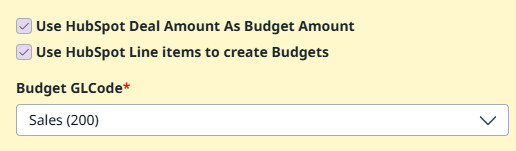
Step 2: Tick “Use HubSpot Deal Amount as Budget Amount.”
Step 3: Select “Use HubSpot Line Items to create Budgets.”
The system will now look for HubSpot line items on deals to create budgets in Projectworks. Line Item net amount will be used as the Budget amount and, the Line Item name as the Budget Name.
If there are no line items in the deal, the system will use the Deal Amount as a single budget.
If there are no line items AND no deal amount on the deal, no budget will be created.
Line Item Support & Validation
We only support billing frequency : “One-time” for the budget line creation. Line items with any other billing frequency are considered invalid and will not be created in Projectworks.
You will see an error on the import advising of the issue in the HubSpot integration page, listing the line items that were not created. This will impact the total budget for the project.
You can fix this either by creating the budgets manually in Projectworks, or changing the billing frequency to “One-time” in HubSpot.
If all Line Items are invalid, the system will fall back creating one single budget using the total deal amount.
Syncing Line Items to Budgets
Line Item Name or Net Price change
Line Item name or Net Price changes in HubSpot will be synced over and the corresponding Budgets are updated in Projectworks.
Line Item Deletion
If a Line Item is removed in HubSpot and there are no associations (e.g. timecodes, people, forecasts or any other linked data) in the corresponding Projectworks Budget, the Budget will be deleted. If there are associated data, the budget is not removed, and warning message will be displayed in the HubSpot integration page advising what to do.
Billing frequency change
If a Line Item’s billing frequency is changed and is no longer “One-time” then the sync will treat it as invalid, and the system will try to remove the budget unless there is associated data. A warning message will be displayed in the HubSpot integration page.
Manually created budgets in Projectworks are never modified.
The system will never update, delete or alter any budget created manually in Projectworks under any circumstances.