.png?width=280&height=39&name=Projectworks-Logo-Black-280px%20(1).png)
This is a beta feature. Follow this link to request more information
Bid Faster and Win More Work with AI-Powered Proposals →
If you don't have permission to configure access level settings and you need to use Proposals - talk to your System Administrator to enable it for you.
How to enable Proposals for an access level
-
Click the Settings cog in the top right hand corner.

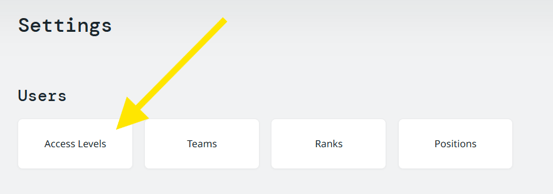
- Click "Access Levels" under the Users section.
-
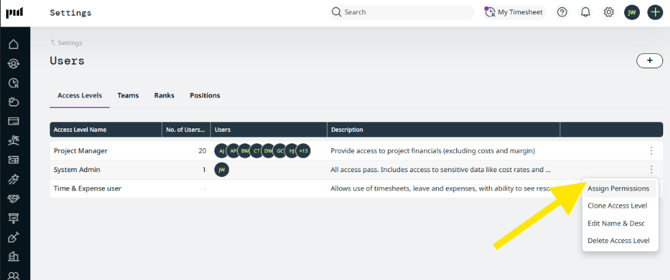
Find the role you want to update (e.g. Project Manager, System Admin), click the ⋮ (three-dot) menu on that row, and choose "Assign Permissions".
-
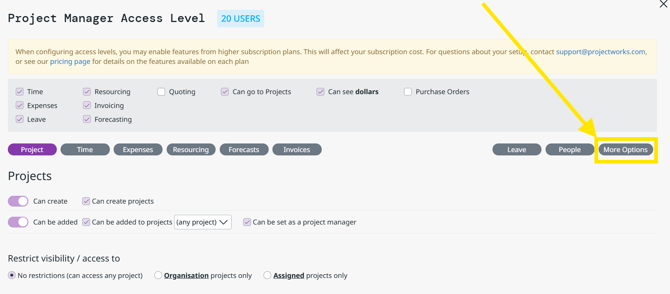
In the permissions window, click "More Options" along the far right hand side of the top.
-
Scroll down to the Proposals section and tick the boxes to grant access as needed.
- Admin.Proposals.DealPipelineStages.View
View & edit & edit deal pipeline stages
See How to set up your deal pipeline → - Proposals.Edit
Access to create and edit Deals and Proposals - Proposals.View
View only access to Deals and Proposals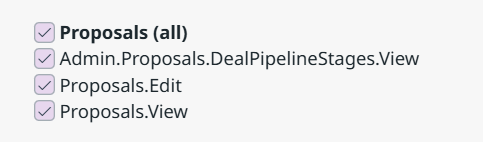
- Admin.Proposals.DealPipelineStages.View
6. Click "Save & Close".