.png?width=280&height=39&name=Projectworks-Logo-Black-280px%20(1).png)
To export expenses from Projectworks to Sage Intacct, you must have the Expense Integration configured.
For an expense to be exportable;
- The organization of the project that the expense is for is integrated to your accounting system
- The supplier field is enabled
- Permissions to see and edit the “Ready to be exported” must then be enabled
- The expense is a company paid expense
- The expense is a planned expense with a status of “Supplier invoice received”
- The expense's checkbox “Ready to export as a bill to pay” is ticked (permissions required, see below)
Access Levels
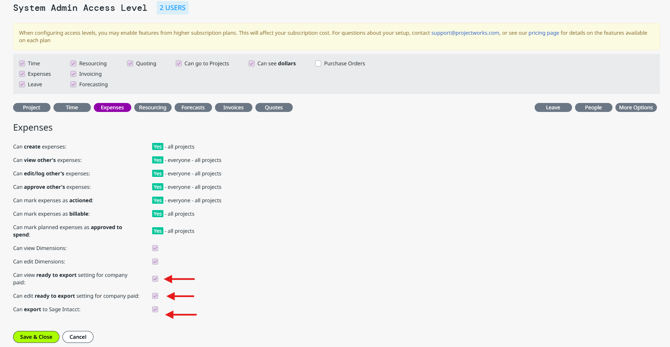
Permissions to see and edit the “Ready be export” checkbox must be enabled on the relevant Access Levels by the Projectworks Administrator in Settings > Access Levels > Access Level > Expenses.
By default the setting is turned off for every access level. Permissions to be enabled:
- Can view ready to export setting for company paid
- Can edit ready to export setting for company paid
- Can export to Sage Intacct
Export Expenses
Exporting an expense as a bill to pay
All expenses that are ready to be exported can be viewed together in the Expenses > Ready for Export tab, as well as all the other places you would expect to see them. Expenses in this tab are:
- Planned expenses to be paid by the company directly that are “Ready to export as a bill to pay”, and not yet exported.
- Reimbursable expense claims that are approved, and not yet exported.
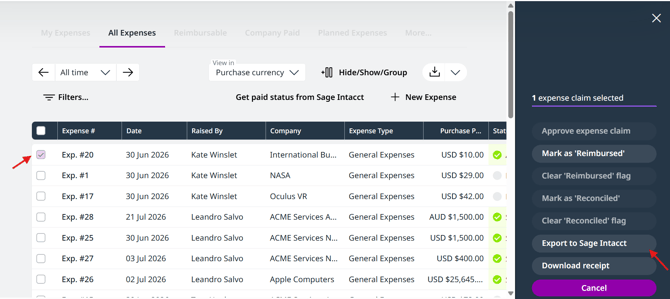
You can either export these individually by using the three dots at the end of each row, or select multiple expenses using the bulk action checkboxes to export in bulk.
Expenses will land in Sage Intacct as a draft bill to pay, with the following details:
- Sage Intacct Bill Date = Projectworks expense ”Date”
- Sage Intacct Due Date = Projectworks expense “Payment Due Date”
- Sage Intacct Reference number = Projectworks “Supplier Invoice Reference”
- Sage Intacct Bill number = Projectworks “Supplier Invoice Reference”
Pulling back the paid status
Once the bill has been paid in Sage Intacct you can pull back this paid status to the expense in Projectworks. The expense will be marked as paid and no longer be a ‘planned expense’. To pull back the paid status:
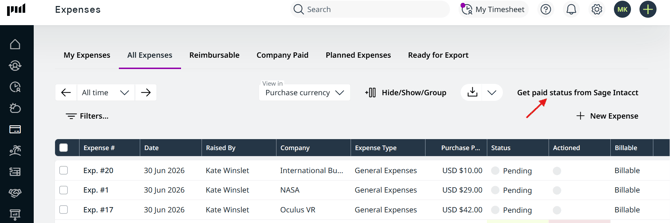
- If you have permissions to export expenses you will also see a button ‘Get paid status from Sage Intacct’ in the top right of all screens in the Expenses section
- Click this to get the latest paid status from Sage Intacct.
Dimensions
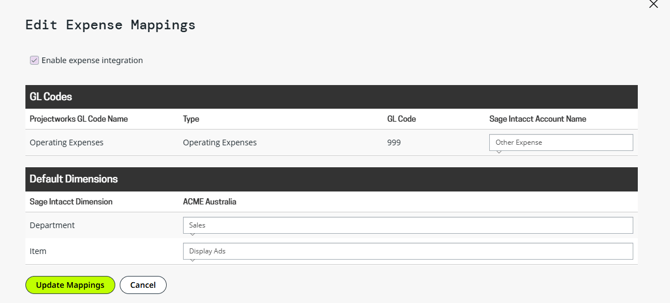
We support Item and Department Sage Intacct dimensions for company paid expenses.
You can set organization wide defaults for expenses in the Settings >Accounting >Expenses.
Values set here will automatically populate for all company paid expenses, but the values are editable on any new expense.