.png?width=280&height=39&name=Projectworks-Logo-Black-280px%20(1).png)
This article covers:
Where to find your Subscription Details
1. Click "Settings".
2. Click "Subscription" under System.
3. You can find the below information.
-
Your Plan: The Pricing plan that you are on. Dependent on your Pricing plan, you may (or may not) have access to some features in Projectworks
(learn more about our pricing plans →). -
Billing Frequency: How often you are invoiced (Annual or Monthly).
-
Subscription Renewal Date: When your current Subscription is up for renewal.
-
Last Invoice: This details the Amount, Date, and number of billed seats invoiced in your most recent invoice.
-20260327-004948.png?width=670&height=443&name=image%20(15)-20260327-004948.png)
How to manage User Access to your Subscription Details
1. Click "Settings".
2. Click "Access Levels" under Users.
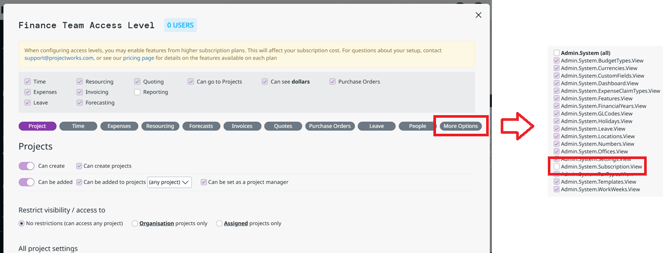
3. Click the Access Level profile that you want to give Subscription View access to (For example, System Admin).
4. Click "More Options"
5. Tick "Admin.System.Subscription.View"
Ensure these two are ticked as well
-
Admin.Home.Dashboard.View; and
-
Global.IsAdmin
6. Click "Save & Close"
Users with that Access Level will now be able to view your Subscription details.
FAQs:
Q: What contributes to my ‘Billed Seats’?
A: Our pricing is a base fee for the first 10 users, and additional fees for each band of 5 users above that. A user is defined as an active person in Projectworks (irrespective of that user’s access or if they log in or not). There is only one type of user.
Q: My invoices aren’t being received by the correct person
A: You provide your primary billing contacts, company name, and address when signing your first contract. To check your primary billing contact’s details or update them, contact [email protected]
Q: Why has my subscription tier changed?
A: Your plan includes the features listed on our Pricing page. If you are on the Build or Scale plan, activating features in Projectworks that are not included in your plan will result in you moving up and being charged for the higher plan.
If you begin using a feature that is not included in your current Subscription, we will contact you via email to discuss the change and confirm any update to your plan before automatically charging you.
If we do not hear from you within 30 days, we will assume you wish to continue with the upgraded feature(s) and will update your Subscription and next invoice accordingly. Downgrades to your Subscription plan or billed users can be done at your next Subscription Renewal Date.
If you believe your plan has been updated in error, please contact your Customer Success Manager or email [email protected] and we will be happy to review this with you.
Q: Can I decrease my billed users?
A: Billed user counts cannot be reduced during an active Subscription term. You may request a decrease in seats at the time of renewal, when changes to your Subscription take effect.
Q: How do I get help with my subscription or account?
A: If you have any questions about your subscription, billing, or account - our team is here to help. Please reach out to us at [email protected], and our team will be happy to help.