.png?width=280&height=39&name=Projectworks-Logo-Black-280px%20(1).png)
- Your migration journey
- Before we start
- How far back can we go?
- How we get your data
- What gets loaded
- Round one: your V1 load
- Going live
- After go-live
Your migration journey
You're not doing this on your own. Projectworks has a dedicated team who handle the technical side of your migration from start to finish. They load your data, make adjustments, and fix anything that doesn't look right. Your job is to give us what we need upfront and review the result. We take care of the rest.
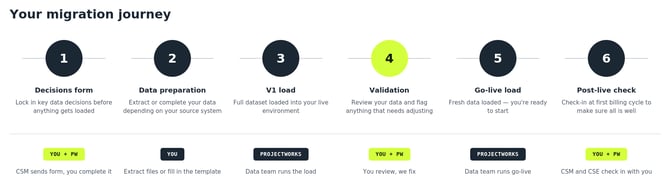
Before we start
Before any data gets loaded, your Customer Success Manager (CSM) will send you a short decisions form. This covers things like how far back your data should go, how you want to handle work in progress, and a few structural decisions about how your data maps into Projectworks.
These decisions matter because Projectworks links transactional data to budgets, not projects, which is different from most tools that stop at company, projects, and tasks. Getting this right early means accurate reporting from day one and no rework once you're live
How far back can we go?
There is no limit on how far back we can bring your historical data. Most businesses bring across everything, but some prefer to start from a specific date to keep things simple. We will confirm this with you as part of the decisions form.
How we get your data
How we bring your data across depends on where it is coming from.
- If you are on Bluerock / WorkflowMax, our data team extracts your data directly from your source system. You do not need to export anything or prepare spreadsheets. We handle the extraction and transform it into the right format for Projectworks.
- If you are on Harvest or Xero Projects, you extract your own data and send it to us as CSV files, and we’ll transform and load the data into Projectworks for you.
- If you are coming from another system or working from spreadsheets, we will provide you with a template to fill in. Your CSM will walk you through it.
If you are coming from another system or working from spreadsheets, we will provide you with a template to fill in. Your CSM will walk you through it.
What gets loaded
We bring across your full dataset, including people, costs, companies, billing contacts, projects, budgets, timecodes, timesheets, expenses, invoices, resourcing, revenue forecasts, and leave.
Round one: your V1 load
Once we have everything we need from you, the data team loads your complete dataset into your live Projectworks environment. This is your full historical data, structured and ready to use.
You will then get access to review it alongside your CSM and Customer Success Engineer (CSE). This is your chance to check that projects look right, time entries are where you would expect them, invoices are linked correctly, and your WIP (uninvoiced work) position makes sense.
If anything needs adjusting, our data team can make bulk updates and corrections during this period. No need to fix things manually line by line.
Going live
Once you are happy with how everything looks:
-
We confirm your go-live date.
-
You provide a fresh, up-to-date dataset.
-
The data team clears the V1 data and loads the final version
This way you are starting Projectworks with the most accurate snapshot of your business.
After go-live
Your CSM and CSE will check in with you at your first billing cycle or month-end. This is when you start running real transactions through the system and get a feel for how everything works in practice. We are there to make sure you are set up for success.