.png?width=280&height=39&name=Projectworks-Logo-Black-280px%20(1).png)
Before you get started make sure Projectworks and Sage Intacct are connected .
Read more about How to setup Sage Intacct to connect with Projectworks →
Access Levels
To be able to export invoices in Projectworks, your user access level must contain the ‘Can Export to Sage Intacct’ permission.
See Editing Access Levels →
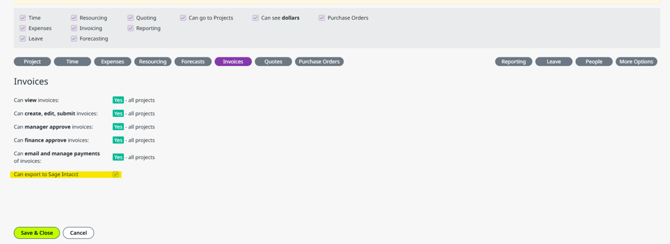
If you are using the automatic sync, the system will attempt to export the invoice upon Finance Approval. See How to configure Sage Intacct integration in Projectworks →
Dimensions
Depending on your integration configuration, selecting Dimensions may be required for your invoice lines so the invoice can be exported.
Each invoice line can include two dimensions.
At the moment, Projectworks supports
- Department, and
- Item
as dimensions. To select them, expand the invoice line and select the desired dimensions on the drop downs.
If the integration is configured to use Order Entry as the invoice destination, each invoice line must have an Item dimension selected, otherwise the export will fail.
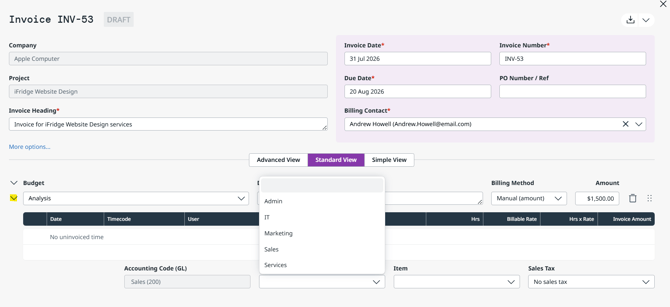
Depending which Sage Intacct Account you have mapped your Projectworks GL code into, there may be a mandatory Department dimension that must be selected in the invoice line.
If one has not been selected, you will receive an error when attempting to export.
Invoice Export
If your configuration is set to target the Accounts Receivable module in Sage Intacct, make sure your GL codes are mapped to Sage Intacct Account names.
If you operate in the US, we recommend using Sage Intacct’s sales tax engine and leaving the Tax Types unmapped.
How to export invoices to Sage Intacct
1. Go to the
- Project > Invoices screen, or
- the Invoices Directory screen
2. Select one or more invoices via the checkbox
3. Selecting ‘Export to Sage Intacct’ on the side panel.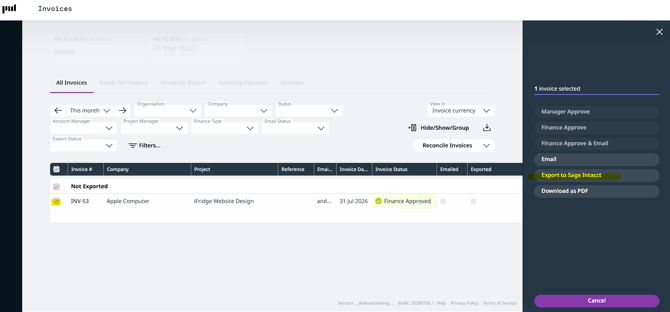
This will trigger a manual export that sends the invoice into the Account Receivable module or Order Entry module in Sage Intacct, depending on your configuration, with all the information in the Invoice.
Payments
Projectworks can reconcile invoice payments from Sage Intacct in two ways, manual and through the automatic sync.
- If you opt to use the automatic sync, the system will poll Sage Intacct for any new payment records every 60 minutes and apply any payments to the invoices automatically.
- If you want to manually sync payments, click the ‘Reconcile Invoices’ button on the Invoices Directory screen to query Sage Intacct for any new payments. You can also opt to sync payments on specific organization individually.
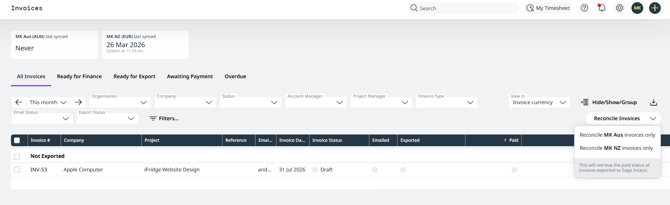
Even if you have the auto-sync turned on, you can always manually reconcile payments as well.